How to Assess Tracking and Phishing Risks When a Link Redirects Through Multiple Websites Before Login
Several redirects before a login page do not automatically indicate phishing. Trackers, shorteners, identity providers, and security gateways can add hops. What matters is whether the final page belongs to the expected service. Stop before entering credentials, identify the destination, and open the service through a known address or bookmark.
How to Assess Risks When a Link Continually Redirects Across Multiple Pages Yourself
Inspect before submitting information. Do not trust a logo, page design, padlock icon, or the first domain shown in a message.
Step 1: Do Not Interact Directly with the Page
If the address bar keeps changing, do not enter passwords, one-time codes, payment information, or personal data. Reject unexpected permission and download prompts. Close the tab if the final domain is unfamiliar. Use the organization’s official app, a bookmark, or an address you type yourself. CISA and the FTC recommend contact details already known to be genuine.
Step 2: Copy the Link (Copy URL)
On desktop, hover over the link and inspect the destination. On mobile, press and hold to preview or copy it. Read the registrable domain carefully: account.example.com belongs to example.com, while example.com.attacker.test belongs to attacker.test. Do not paste links containing email addresses, invitation codes, or reset tokens into public forums or scanners.
Step 3: Use Indirect Redirect Analysis Tools
A remote scanner can display redirects, domains, requests, and screenshots without using your normal browser. It does not prove safety because sites may change behavior by location, time, or scanner detection. Check visibility first. urlscan.io offers public, unlisted, and private scans; VirusTotal separates public analysis from private scanning. Public submissions should not contain confidential information or private access tokens. A clean result is not a guarantee.
Red Flag Warnings: Signs Your Redirect Link Is Extremely Dangerous
The Final Destination Is a Newly Registered Domain:
A new domain is suspicious when it imitates an established service, but the claimed 70 percent risk for domains under 30 days old is unsupported. Attackers also compromise old domains.
ICANN Lookup can show available registration data, including registration dates where those details are publicly available. Combine domain age with spelling, reputation, and the reason the link was sent. RDAP replaced WHOIS as the definitive source for generic top-level domain registration data in January 2025.
Excessive Number of Redirect Hops:
There is no universal four-redirect threshold. Tracking, regional routing, consent pages, and federated login can create longer chains. Focus on unexplained jumps and a mismatched final domain. A single redirect can lead directly to a phishing page, while a legitimate authentication process may require several domains. The number of hops is therefore a supporting clue rather than a verdict.
Mid-Transit Security Protocol Downgrades:
An unexpected move from HTTPS to HTTP is a serious warning because the HTTP request is not protected by TLS. Do not continue to a login page through that path. HTTPS still does not prove legitimacy. It protects data in transit between the browser and the connected server, but a phishing operator can also obtain a valid certificate for a deceptive domain. The hostname must still be verified.
Sensitive Path Keywords Hosted on Unrelated Domains:
Words such as /login, /verify, or /secure provide no assurance. A login page on a misspelled brand domain, unrelated host, raw IP address, or unexplained subdomain is suspicious.

Understanding Redirect Status Codes (301, 302, 307) Through a Security Lens
HTTP codes describe behavior, not trustworthiness. Legitimate and malicious sites can use the same codes.
301 Moved Permanently:
A 301 says the resource has moved permanently and is common during site migrations. A 301 from an unfamiliar domain is not proof of SEO poisoning; inspect the endpoint.
Depending on the response and cache rules, browsers and intermediaries may reuse the new destination for later requests.
302 Found / Temporary Redirect:
A 302 points elsewhere temporarily. Browsers may change POST to GET when following 301 or 302 responses, so it should not be described as preserving submitted login data.
A 302 is commonly used in legitimate tracking and authentication systems, but attackers can use it as well. Its presence reveals nothing by itself about the owner’s intention.
307 Temporary Redirect:
A 307 is temporary and preserves the request method and content. This is more predictable for non-GET requests, but not inherently safer. A malicious server can issue a 307 just as easily as a legitimate server. The IETF defines these differences as HTTP request and redirect semantics, not phishing ratings.
Sophisticated Traps, Tricks, and Hacker Attack Mechanisms
Open Redirect Vulnerabilities: When Attackers Exploit Trusted Brands
An open redirect lets a trusted site forward users to an unvalidated destination. Attackers can show the trusted domain first while controlling the endpoint. For example, the visible link may begin with a real organization’s domain but include an external destination inside a parameter such as url=, redirect=, next=, or return=. OWASP identifies unvalidated redirects as a phishing risk because users may trust the first domain without checking where the browser ultimately lands.
Stealthy 1 × 1 Pixel Tracking and Silent Metadata Leakage
A tracking pixel can report that a link was opened and expose the source IP, time, request headers, and User-Agent. These support approximate inferences, not an exact address or complete device identity. The User-Agent may identify the browser family, operating-system family, or application version, although modern browsers increasingly limit some identifying details.
Encoded Redirect Parameters That Hide the Destination
Base64 or percent-encoded parameters can hide a destination from casual inspection, but encoding alone is not malicious. Legitimate services also encode session state, campaign identifiers, and return addresses. Risk rises when the endpoint is unrelated to the sender, imitates another organization, or unexpectedly requests credentials. The original claim that attackers specifically depend on Bing or Baidu to decode Base64 destinations is too narrow and unsupported as a general rule.
IDN Homograph Attacks: Visual Impersonation Traps
Internationalized domains may contain Unicode characters resembling another script. A Cyrillic character, for example, may look similar to a Latin character while representing a different domain. ICANN has documented the potential use of visually confusing internationalized domains for phishing and malware distribution. Browsers may show Unicode or an xn-- Punycode form, depending on the domain and browser safety rules. Read the full domain carefully instead of relying on its visual appearance.
The Truth About Clicking Phishing Links: Is Your Device Compromised Instantly?
Standard Scenario: Opening a link can expose metadata and confirm an address is active. Entering nothing and opening no download lowers account risk, but does not guarantee safety. High-Risk Scenario: A link may deliver a malicious download, exploit an unpatched browser, display a fake support prompt, or request permission to connect an outside application to an account.
If you entered a password, change it through the real service, change reused passwords, review active sessions, and enable multifactor authentication. Never change the password through the suspicious page. If a file downloaded or opened, update your security software and run a scan. The FTC recommends scanning when a clicked link or attachment may have downloaded malware. Keeping browsers, operating systems, and applications updated also reduces exposure to known vulnerabilities.
Trusted Services Used as Intermediary Redirect Hubs
A recognizable intermediary does not validate the endpoint. Legitimate infrastructure can be misused or compromised.
Email Marketing & Click Tracking Platforms:
These services redirect clicks to measure engagement. Verify the endpoint instead of assuming every tracked link is safe or malicious. A legitimate tracking domain can lead to an authentic website, while a compromised marketing account may send users elsewhere.
Major Hosting & Acceleration Infrastructure:
Cloud hosting, content-delivery networks, and storage services host both legitimate and abusive content. The provider’s name does not identify who created a page.
Professional Networks:
Social networks, document-sharing services, and profile-link pages may lead to external sites. Inspect the endpoint before signing in.
Government & Municipal Portals:
Government sites are not immune to compromise or open redirects. The claim that they are frequently used as stepping stones is too broad without evidence. A government domain appearing early in a redirect chain does not establish that the final destination is operated or approved by that government body.
Free Tools to Safely Unpack and Preview Final Link Destinations
1. Online Web Inspection Services
VirusTotal provides URL reputation; urlscan.io shows requests, domains, screenshots, and redirects. Use restricted visibility for personal links.
Review:
- The final registrable domain.
- Unexpected third-party domains.
- The scan date and reputation warnings.
- Credential forms, downloads, and permission requests.
- Scanners can miss conditional attacks or produce false positives. They should supplement domain verification rather than replace it.
2. Command Line Inspection Using curl (For Technical Users)
Use:
curl -sI -L --max-redirs 10 "[SUSPICIOUS_URL]"
-I requests headers, -L follows redirects, and --max-redirs limits the chain. It may reveal server-side Location headers without rendering the complete page, but it can miss JavaScript redirects. HEAD responses may also differ from GET responses.
Running curl locally still contacts the suspicious server and exposes your IP address. Never include credentials, cookies, authorization headers, or private tokens. The curl documentation confirms that --location follows redirects, --head requests headers, and --max-redirs limits redirect following.
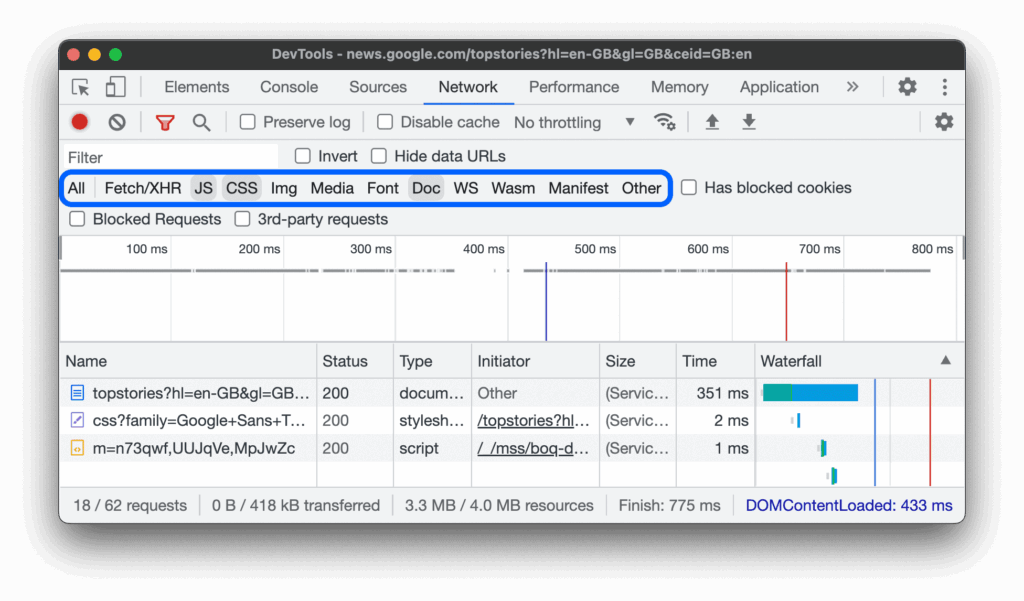
3. Browser Developer Tools (Network Tab)
Chrome DevTools can preserve requests across page loads and display redirect responses. Because this method loads the site, it is not a safe first choice for an unknown link. For authorized investigation, use a separate test profile or isolated environment:
- Open Developer Tools.
- Select Network and enable Preserve log.
- Navigate only inside the isolated environment.
- Review status codes,
Locationheaders, domains, downloads, and scripts. - Chrome’s documentation confirms that Preserve log retains network requests across page loads.
Redirect count does not establish safety. The strongest warning is a login request on a domain unrelated to the expected organization. Before signing in, close the redirected page and open the service through its official app, bookmark, or known address. Treat domain age, redirect count, HTTPS, status codes, and scanner verdicts as supporting signals. Never submit passwords, one-time codes, recovery codes, payment details, or application permissions until the final registrable domain has been verified.