
Online Account Security Settings Priority Against Hacking
When it comes to securing your digital life, trying to configure dozens of security settings across every app you own can feel overwhelming. Many people make the mistake of setting a complex password on a random shopping site while leaving their primary portal accounts exposed.
In Korea’s digital ecosystem, a single breach of your primary portal account can trigger a cascading hack across your entire online identity. If an attacker gains access to your main email or social login hub, they can easily reset passwords for your connected shopping, gaming, and financial applications.
You do not need to configure every security toggle at once. This guide provides a clear, prioritized defense roadmap, showing you which accounts and settings to secure first to establish an immediate anti-hacking barrier.
Priority 1: Securing your primary Naver or Kakao account with 2-step verification
Your highest security priority must always be your “Root Account”—the primary portal or email service that manages password reset requests for your other accounts.
Why Naver and Kakao are master keys
In Korea, Naver (네이버) and Kakao (카카오) serve as the primary gateways for Social Single Sign-On (SSO) logins. Major Korean e-commerce platforms, food delivery apps, and gaming portals allow users to sign in directly using their Naver or Kakao credentials.
If a hacker compromises your Naver or Kakao account, they do not just read your emails—they gain the master key to reset passwords across every linked service. Securing this single primary account shuts down the majority of credential harvesting attacks.
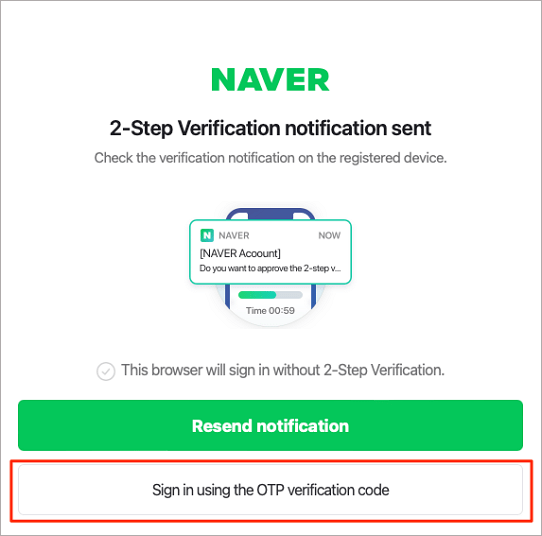
Enabling 2-step verification (2단계 인증)
Go directly to your Naver or Kakao security settings and turn on 2-Step Verification (2단계 인증). Once enabled, logging in from a new device requires both your password and an immediate confirmation prompt sent to your primary smartphone.
When configuring two-factor authentication, choose push app notifications or Naver OTP over standard SMS text messages whenever possible. App-based prompts generated locally on your phone are immune to SIM-swapping and SMS interception attacks.
Priority 2: Signing out unfamiliar devices and blocking foreign logins
Once your primary login process is secured with 2-step verification, your next priority is terminating active unauthorized sessions and blocking automated overseas hacking attempts.
Checking active signed-in devices and location histories
Navigate to your account’s “Signed-In Device Management” (로그인 기기 관리) menu. This screen lists every smartphone, tablet, and PC currently logged into your account, along with their IP locations and last active timestamps.
If you see an unfamiliar phone model, a browser you never use, or a login from a city you have not visited, select the option to perform a remote sign-out (원격 로그아웃) immediately.
Enabling foreign and regional IP login blocks
Korean portal accounts feature one of the most effective location defense tools available: “Foreign IP Login Block” (해외 로그인 차단) and “Regional Login Block” (타지역 로그인 차단).
Because a vast majority of automated credential-stuffing attacks originate from overseas proxy servers, toggling on “Foreign IP Login Block” in your Naver or Kakao security settings instantly rejects any login attempt coming from outside Korea, even if the attacker knows your correct password.
Priority 3: Cleaning up connected apps and updating recovery information
The final priority phase involves closing secondary backdoors that hackers use to maintain persistent access or bypass password resets.
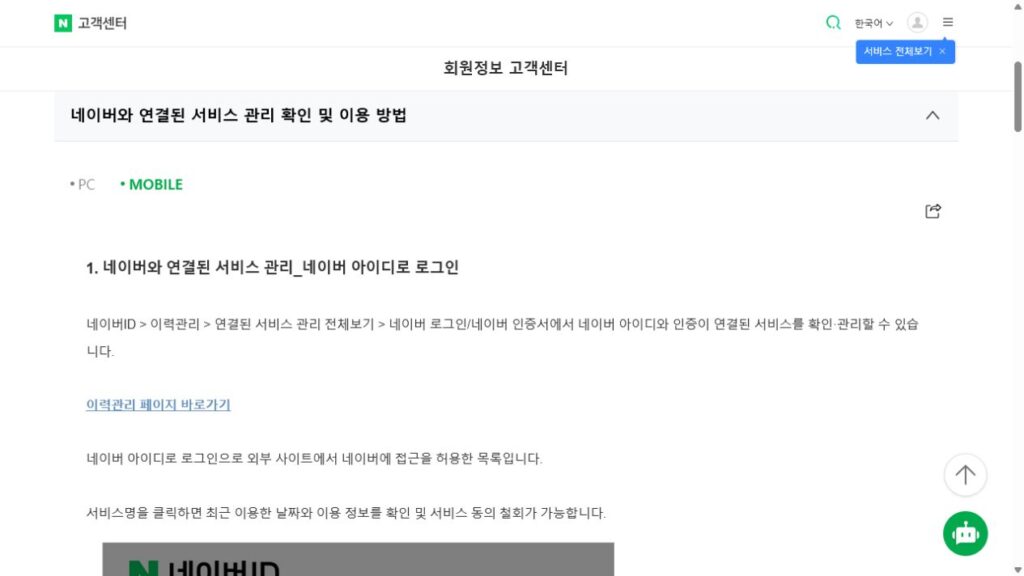
Auditing connected service permissions (연결된 서비스 관리)
Over time, users grant permission to dozens of third-party apps, old mobile games, and discontinued shopping sites using their Naver or Kakao social login. Navigate to the “Connected Services Management” (연결된 서비스 관리) menu.
If an old third-party app suffers a data breach, hackers could exploit its stored access token to pull data from your main portal account. Revoke access permissions for any service or app you no longer actively use.
Updating recovery email and phone numbers
Review your account recovery contacts under the “Account Info” menu. Ensure that the secondary recovery email address and mobile phone number listed belong strictly to you and are currently active. Hackers who gain temporary access to an account often add their own secondary recovery email to regain access later; removing outdated or unfamiliar contact details seals this loophole.
Account security priority checklist: What to enable first
Use this priority reference table to execute your account security audit in the correct sequence:
| Security setting | Priority level | Navigation location | Immediate anti-hacking benefit |
| Primary account 2-step verification | Top Priority (Step 1) | Naver/Kakao Security Settings | Prevents login even if password is stolen |
| Foreign IP login block (해외 로그인 차단) | High Priority (Step 2) | Security Center -> Login Protection | Blocks automated overseas hacking bots |
| Signed-in device audit (로그인 기기 관리) | High Priority (Step 3) | Security Center -> Device List | Terminates unauthorized active sessions |
| Connected app cleanup (연결된 서비스 관리) | Medium Priority (Step 4) | Account Settings -> Linked Apps | Seals backdoor access from hacked third-party sites |